The Hidden Costs of Manual Data Entry (And How the SuiteX iPaaS Eliminates Them)

Quinn Johns • April 10, 2025

Nothing can hold a company back like manual data entry. Here's how to eliminate it.


Manual data entry may seem like a simple solution when platforms don’t communicate. However, it’s not. It can make matters so much worse. Manual input can slow operations significantly and introduce costly errors your business can’t afford.


We know how much sluggish processes and grave mistakes can damage your company. The SuiteX Integration Platform as a Service (iPaaS) helps eliminate these issues using automated workflows and bidirectional data sync. It ensures data flows freely and automatically between all your systems and logs errors as they happen.


Read our guide below on the negative impact manual entry can have on your entire organization. Then, schedule a SuiteX demo with our team. The platform offers seamless data transfer that ensures your company runs smoothly—without fear of expensive errors.  


Key Takeaways


  1. Manual data entry costs businesses significantly more than labor hours. It creates cascading financial impacts, including error correction costs, operational inefficiencies, and opportunity costs.
  2. According to research, manual data entry has approximately a 1% error rate. Employees spend about 10% of their work time on manual entry tasks and lose an average of 60 hours monthly to functions that could be automated.
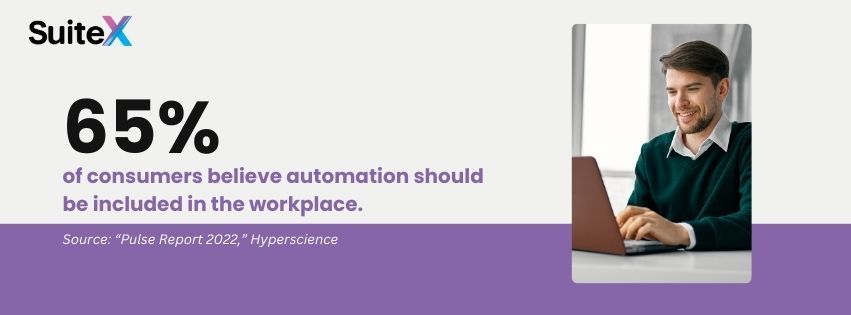
  3. Consumer sentiment supports automation, with 65% of consumers believing it should be incorporated into the workplace. This indicates that it's not just an internal efficiency measure but a customer expectation.
  4. SuiteX iPaaS transforms business operations by creating a unified digital ecosystem with automated data synchronization, pre-mapped integrations to significant platforms, and bidirectional syncing capabilities.
  5. iPaaS solutions eliminate the immediate costs of manual data entry (labor, errors, reconciliation time) and provide strategic advantages by redirecting human resources toward innovation and enabling real-time decision-making.


Graphic stating that 65% of consumers believe automation should be included in the workplace.


The Price Tag of Manual Data Entry


At first glance, manual data entry might seem like a slow, operational inconvenience. Yet, manual input can cause serious problems that hamper your company's chances of competing. Transferring information from one system to another creates a cascade of hidden costs throughout your organization.


These expenses silently erode profit margins while creating friction in nearly every business process. Manual data practices drain resources in ways that rarely appear on traditional balance sheets, including salary hours dedicated to repetitive keystrokes and the compounding effect of minor errors that grow into significant discrepancies.


It’s even more concerning how these inefficiencies compound over time. They create operational bottlenecks and strategic disadvantages, while competitors with streamlined data flows can respond more quickly to market opportunities, access real-time insights, and dedicate human capital to innovation rather than maintenance.


The actual cost of manual data entry isn't measured just in dollars spent but in missed opportunities and unrealized growth potential. This shift toward automation isn't merely a business preference—it reflects broader societal recognition of its value. In fact, 65% of consumers believe automation should be included in the workplace, according to Hyperscience’s “Pulse Report 2022.”


This consumer sentiment indicates that automation isn't merely an internal efficiency play but an expectation that influences how customers perceive your business operations and reliability.


Direct Financial Costs of Manual Entry


A 2024 ProcessMaker report says the average office worker spends 10% of their work time in manual entry. These tedious, easily automated tasks carry high costs for companies, including:


Labor Expenses: Unnecessary staff hours can cost a company thousands monthly—and could be directed toward growth initiatives instead.


Other manual entry issues include:


  • Overtime Costs: Data synchronization often requires overtime pay during high-volume periods like holiday seasons.
  • Training Investment: New employees need extensive training on multiple systems and entry protocols, increasing onboarding costs.


Operational Inefficiencies


  • Processing Delays: Manual entry creates bottlenecks that slow down order processing, inventory updates, and financial reporting. A study commissioned by Automation Anywhere reports that employees lose an average of 60 hours monthly to easily automated tasks.
  • Resource Diversion: IT and operations teams spend valuable time troubleshooting data discrepancies rather than focusing on strategic improvements.
  • Delayed Decision-Making: Without real-time data synchronization, leadership makes decisions based on outdated information.


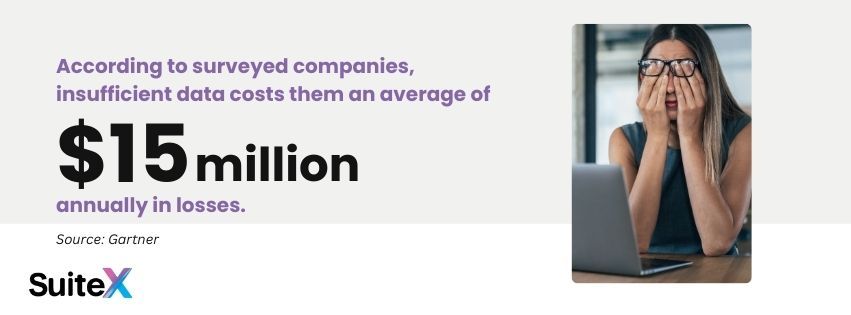
Graphic stating that according to surveyed companies, insufficient data costs them an average of $15 million annually in losses.


Real-World Impact


Consider this scenario: A medium-sized retailer sells through their own website, Amazon, and several major retail partners manually transfer orders, inventory, and customer data between systems. Each month, they experience:


  • 2-3 inventory discrepancies leading to overselling or stockouts
  • 5-7 hours of reconciliation work per week
  • 1-2 delayed financial reports
  • Multiple instances of customer service issues stemming from data errors


Over a year, these seemingly minor issues compound into significant financial and reputational damage.


How iPaaS Eliminates Hidden Costs


Integration Platform as a Service (iPaaS) solutions like SuiteX fundamentally transform how your business systems communicate, eliminating hidden costs through automated workflows and bridging gaps between previously siloed applications.


SuiteX iPaaS creates a unified digital ecosystem, establishing persistent connections that synchronize data across your technology landscape without human intervention. This consolidation eliminates labor costs, processing delays, and error-prone manual procedures while improving the organization’s data consistency, accuracy, and availability.


Automated Data Synchronization


SuiteX iPaaS creates seamless connections between NetSuite and your tech stack, ensuring data flows automatically between systems. This automation:


  • Eliminates human error in data transfer
  • Ensures real-time data consistency across platforms
  • Frees staff to focus on value-adding activities
  • Scales effortlessly with transaction volume


Pre-Mapped Integrations


SuiteX stands out by offering pre-mapped integrations with major platforms, including:


  • E-commerce channels like Shopify, Amazon, and eBay
  • Retail partners including Target, Walmart, Wayfair, Bed Bath & Beyond, Macy's, and Kohl's
  • Business tools such as Power BI and Salesforce


These prepared connections dramatically reduce implementation time and ensure robust, tested data flows from day one.


Graphic stating that 10 out of every 1,000 data entries are incorrect.


Bidirectional Synchronization


Changes made in any connected software automatically update across your entire ecosystem. This two-way sync:


  • Maintains a single source of truth
  • Reduces reconciliation efforts
  • Enables real-time decision-making
  • Prevents data conflicts


User-Friendly Error Management


Even in automated systems, exceptions occur. SuiteX's error-logging capabilities:


  • Immediately identify synchronization issues
  • Provide detailed diagnostic information
  • Enable quick resolution without technical expertise
  • Prevent cascading data problems


Grow More Efficient and More Accurate


Manual data entry isn't just inefficient—it's a significant hidden cost that impacts your bottom line, team morale, and competitive positioning. The SuiteX iPaaS automates workflows and introduces automatic bidirectional data sync into your processes so your operations run faster and smoother and your records remain accurate.


The question isn't whether you can afford integration technology—it's whether you can continue absorbing the hidden costs of manual data entry.


Schedule your free SuiteX demo with our team today and discover how far your business can go when it’s not hampered by manual input.


Frequently Asked Questions


1. How long does a typical SuiteX iPaaS implementation take from start to finish?


SuiteX iPaaS integrations are simple and can be completed within a few weeks without disrupting your company’s daily operations.


2. What happens if my business needs change and I need to add new integration points after implementation?


SuiteX iPaaS is designed for flexibility and scalability. Adding new integration points to your existing setup is straightforward and doesn't require rebuilding your entire integration framework. Our system uses a modular architecture, allowing easy expansion as your business grows or your technology ecosystem evolves.


3. How does SuiteX iPaaS handle sensitive customer data and maintain security across multiple platforms?


SuiteX iPaaS employs enterprise-grade security measures, including data encryption in transit and at rest, role-based access controls, and regular security audits. All data transfers between systems occur through secure API connections with proper authentication mechanisms, ensuring your customer information remains protected while moving seamlessly between platforms.


4. How much can SuiteX actually save on our NetSuite licensing costs?


Most organizations implementing SuiteX experience NetSuite licensing cost reductions of up to 50%. The software achieves this by providing modern, user-friendly interfaces that extend system access to your entire team without requiring full licenses for every user. Meanwhile, it maintains perfect data integrity within your NetSuite environment.


Headshot of Quinn Johns

Quinn Johns is the Technical Lead at SuiteX and has 18 years of experience as a full-stack developer. His expertise spans scalable database architecture, maintainable code development using established design patterns, and abstract problem-solving that transforms complex business challenges into elegant solutions. Quinn has demonstrated technical mastery across Laravel, PHP, JavaScript, and SQL while successfully building and leading diverse development teams on large-scale NetSuite-integrated projects. Currently, Quinn focuses on refining development processes, enhancing team efficiency, and creating meaningful career advancement opportunities for his colleagues. He lives in Montana with his wife and son.





Disclosure: This article was developed with the assistance of Claude, an AI created by Anthropic. Our editorial team used Claude as a collaborative writing tool, carefully reviewing, editing, and fact-checking all AI-generated content. The final text has been thoroughly vetted to ensure accuracy, clarity, and alignment with SuiteDynamics' editorial standards. We take full responsibility for the content presented in this article, maintaining our commitment to providing reliable and informative insights to our readers.

July 9, 2026
A Manufacturing Execution System is the software that sits between your ERP and your shop floor. While ERP manages the plan (what to build, when, and for whom) an MES manages the execution: dispatching work orders to operators, capturing labor and machine time, enforcing quality checks, tracking materials lot by lot, and recording exactly what was built and how. The international standard that defines MES functionality is ISA-95 (also known as the MESA model). It breaks manufacturing execution into several core domains: Production execution: Work order dispatch, electronic work instructions, operator clock-on/off Data collection: Real-time machine and operator data, barcode/RFID scan, manual entry Quality management: In-process inspections, non-conformance, CAPA tracking Traceability & genealogy: Lot/serial tracking, as-built records, recall readiness Performance analysis: OEE, downtime reasons, scrap rates, throughput Labor & resource management: Skills, certifications, labor capture against orders If you're managing any of these today, even informally, you're doing MES work. The question is whether your tools are keeping up with your operation. Isn't that what work orders in NetSuite are for? Sort of. NetSuite's native work order functionality is excellent for planning and financial purposes. It creates demand, allocates inventory, and closes out costs against the job. But it wasn't built for what happens between the moment a work order opens and the moment it closes. On the shop floor, a work order involves multiple operation steps, multiple operators across multiple shifts, real-time material issues, setup time, run time, scrap, rework, and quality holds. NetSuite records the result. An MES manages the process. NetSuite tells you a work order is done. SuiteX MES tells you how it got done… step by step, operator by operator, part by part. Key capabilities include: Work order creation, synced in real time Step-by-step operation dispatch, full routing with sequencing Operator-level labor capture with live start/stop at each step Built-in, step-level electronic work instructions Real-time completion tracking by operation and quanitity Automated OEE & downtime tracking with reason codes Lot/serial traceability  What does an MES actually look like in practice? In SuiteX MES, an operator on the floor starts their shift and opens a work order dashboard, configured to show exactly the jobs assigned to their workcenter, segmented by status and due today. They tap into a job and see their operation steps in sequence. Each MES card shows the routing step, the expected setup time and run time, and the work instructions for that operation, including drawings, SOPs, reference documents, all accessible without leaving the screen. The operator hits start, works the job, and hits complete. Time is captured automatically and posted against the work order in NetSuite without end-of-day catch-ups or manual re-entry. As they step through operations, the system sequences them to the next step automatically. If a step is partially complete, it flags it. When the final operation closes, a full summary displays the total units completed at each step, total run and setup time, and any issues logged. The work order is closed in NetSuite with a single tap. Signs your operation is ready for an MES You don't need to be running 24/7 continuous production to benefit from an MES. You need it when your current approach to managing the shop floor is creating friction, errors, or blind spots that cost you. Here are the most common signs: Paper travelers or whiteboards are your primary method of tracking work order status Labor time is entered after the shift, from memory, or not at all You find out about quality issues after parts have already moved downstream A customer asks for lot traceability on a shipped order and it takes hours to reconstruct You're estimating OEE or scrap rates rather than measuring them Operators ask supervisors which job to run next rather than seeing a live queue What about manufacturers who aren't quite there yet? MES doesn't require a mature operation. In fact, implementing MES often is how an operation matures. If you're currently on paper or spreadsheets, going directly to a native-ERP MES like SuiteX is often faster and cheaper than first building out manual processes and then replacing them later. The right question is whether the cost of your current approach, in labor re-entry, quality escapes, lack of visibility, and integration overhead, is higher than the cost of fixing it. For most discrete manufacturers on NetSuite, it is. An MES is the operating layer you are missing An MES connects your ERP plan to the reality of your shop floor. If you're running on NetSuite, SuiteX MES is the only solution that lives inside your existing system rather than alongside it. Schedule a demo to see SuiteX MES in action and speak with our team.

A man and a woman are sitting at a table looking at a laptop computer.
By Quinn Johns April 24, 2025
Discover how ERP interface complexity affects productivity and costs. Learn how SuiteX enhances NetSuite usability, driving financial results and ROI.

A woman is sitting at a table talking on a cell phone while holding a piece of paper.
By Quinn Johns April 9, 2025
Stay ahead in the marketplace with real-time data integration. Read our guide on SuiteX iPaaS and learn how to optimize your business for success.

Man working on his computer in office
March 19, 2025
Specialized solutions are vital for any business in the software industry. Data siloes and inefficiencies, however, are not.

A man in a suit is using a tablet computer.
March 12, 2025
Discover how SuiteX simplifies change management in NetSuite, enabling rapid user adoption and effective communication to enhance workplace efficiency and satisfaction.

Workers on job site in yellow vests
March 11, 2025
The words "simple" and "manufacturing" almost never go together. Yet, SuiteX eases the complexity of NetSuite and daily operations so your team can work faster and better.

A group of people are sitting around a table having a meeting.
February 26, 2025
Discover the hidden costs of communication gaps in organizations. Learn how to enhance collaboration and reduce costly errors through effective communication tools.

A group of people are looking at a computer screen.
February 24, 2025
Explore the fundamentals of project hierarchies. Get best practices for task organization, managing dependencies in NetSuite, and maintaining project visibility.

Two women are sitting at a table looking at a tablet.
February 18, 2025
Build a strong foundation for team communication. Explore essential tips to promote psychological safety and ensure every voice is heard in your organization.

Two coworkers collaborate in front of a laptop.
January 24, 2025
SuiteX launches a cutting-edge NetSuite extension platform that revolutionizes enterprise software interaction, boosting productivity and reducing costs for organizations.
Show More