

Mastering NetSuite Project Hierarchies: A Guide to Parent-Child Task Management

February 24, 2025

Your team can't maximize their talents and resources if they can't manage their tasks and time. The right strategies and software can help.


Managing complex projects can feel like conducting an orchestra. Every instrument needs to play its part at just the right time.


Otherwise, the song falls flat—or the project fails.


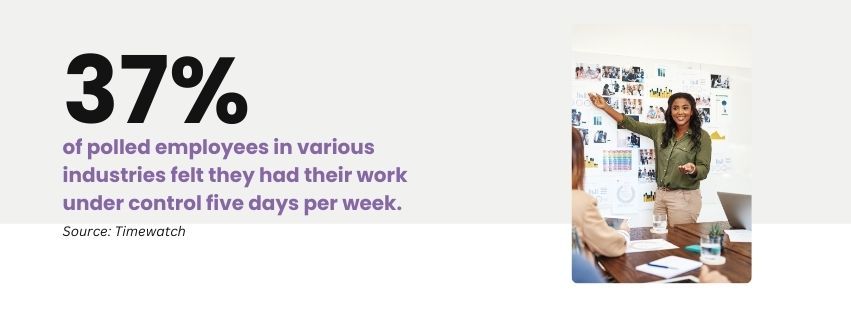
A solid project hierarchy system helps keep each task in perfect harmony, which is critical for an efficient workplace.  According to a Timewatch survey, only 37% of polled employees in various industries felt they had their work under control five days per week. Fortunately, tools like project hierarchies help employees stay organized and on-task.


SuiteX software works with your NetSuite Enterprise Resource Planning (ERP) system to enhance project management capabilities so your team can arrange their tasks effectively and keep their projects on schedule. It offers advanced features—like an interactive Gantt chart, team commenting and notifications, and built-in reporting—that make NetSuite’s robust project management software even more powerful.


Read through our quick guide to project hierarchies and learn the best practices for parent-child task management. You’ll also discover how SuiteX boosts project visibility, collaboration, and reporting. Then, contact our experts for a free SuiteX demo and experience the features for yourself. You’ll find out how easy it can be to keep your team on task and productive.


Key Takeaways


  1. Project hierarchies function like a family tree, where parent tasks represent major project phases and child tasks are the specific activities needed to complete them. This creates clear information channels where updates naturally flow upward, keeping everyone informed automatically—much like how news travels through a well-organized team.
  2. The optimal project structure maintains a balance in hierarchy depth, with a recommended maximum of four levels. Going deeper than this is like trying to nest too many Russian dolls; it becomes confusing and counterproductive. If a task takes less than two minutes, it probably doesn't need further breakdown.
  3. Dependencies between tasks act as the project's nervous system, with four main types: Finish-to-Start, Start-to-Start, Finish-to-Finish, and Start-to-Finish. These relationships automatically update across the project timeline, ensuring that when one task shifts, all connected tasks adjust accordingly.
  4. Visibility and reporting are the project's vital signs, requiring regular monitoring through customized dashboards, automated status reports, and role-specific views. This multi-layered visibility allows teams to zoom in and out of project details as needed.
  5. Regular maintenance routines are essential for keeping the project structure healthy, including weekly hierarchy reviews, dependency validations, and resource allocation updates.


Graphic stating that 37% of polled employees in various industries felt they had their work under control five days per week.

Project Structure Basics


A project hierarchy is like a family tree. Parent tasks represent major project phases or deliverables, while child tasks are the specific activities needed to accomplish them. This structure provides a clear line of sight from the highest-level objectives down to the daily work.


Why Project Hierarchies Matter


Project hierarchies are the backbone of effective project management, and there are various reasons why you need to get them right.


  • Information Flow Management: Hierarchies create natural information channels within your project. When a junior developer updates a child task's status, that information automatically rolls up to parent tasks, keeping project managers and stakeholders informed without manual updates. SuiteX enhances this with automated notifications.


  • Resource Optimization: Well-structured hierarchies make resource allocation more intuitive. Project managers can assign teams to parent tasks while individual team members manage their specific child tasks, preventing duplicate work and resource conflicts.


  • Risk Management: By organizing tasks hierarchically, you can better identify and manage risks at every level. If multiple child tasks under the same parent are falling behind, it may signal a systemic issue that needs addressing.


As you organize project tasks, keep these tips in mind:


  • Start with broad strokes before adding detail. An artist begins with rough sketches before adding fine details, and in the same way, you should build your top-level parent tasks first to establish your project's framework.


  • Group related activities under logical parent tasks to create natural workflows that your team can easily follow and update.


Leveraging Parent-Child Relationships


The magic of NetSuite's hierarchy system lies in how parent and child tasks interact. When child tasks are updated, their parent tasks automatically reflect those changes, like a living, breathing project dashboard.


SuiteX enhances this parent-child relationship by supporting real-time task updates and team collaboration. Team members can comment directly on tasks, tag colleagues for input, and receive instant notifications when changes affect their work. This creates a more dynamic and responsive project environment where information flows seamlessly between team members.


Task Organization Best Practices


Your project structure should tell a story. Each parent task should represent a clear milestone or phase, with child tasks forming the chapters that get you there.


Graphic defining task depth as the number of subtask levels within a project hierarchy.


Establishing Clear Hierarchies


The key to effective task organization is creating intuitive structures that your team can navigate effortlessly. Start by establishing these foundational elements.


  • Create standardized parent task categories that align with your project methodology. Your top-level structure should reflect your chosen framework and make sense to everyone involved. These methodologies could include:


  • Waterfall Task Management: Tasks follow a strict sequential order. Each phase must be completed before the next can begin, like steps in a recipe.


  • Agile Task Management: Tasks are organized into short "sprints" with flexible priorities, allowing teams to adapt and adjust as needs change.


  • Hybrid Task Management: Combines sequential Waterfall phases for structured work with Agile sprints for dynamic elements that need frequent adjustments.


  • Implement a robust naming convention system that instantly communicates task type, priority, and ownership. For example, "[Phase]-[Department]-[TaskType]-[Description]" helps team members quickly identify relevant tasks.

Optimizing Task Depth


You must balance your hierarchy levels and find the right “depth” for effective management. Task depth refers to the number of subtask levels within a project hierarchy. Go too deep, and you’ll create confusion. Yet, staying too shallow will not provide enough organizational structure.


Consider these guidelines:


  • Maintain a maximum of four hierarchy levels for most projects. This number provides enough depth for detail while preventing a "nested doll" effect that can confuse team members.


  • Use a two-minute guideline when creating child tasks: if a task takes less than two minutes to complete, it probably doesn't need to be broken down further.


Task Description Best Practices


Clear task descriptions serve as your project's documentation. Make them count by:


  • Including key information in a consistent format
  • Task objective
  • Required resources
  • Expected deliverables
  • Success criteria
  • Dependencies and prerequisites


  • Writing descriptions that answer the five W's (Who, What, When, Where, Why) and How


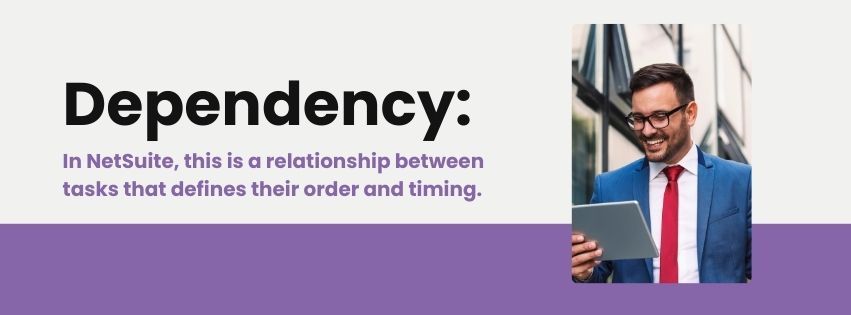
Graphic describing a NetSuite dependency as a relationship between tasks that defines their order and timing.


Managing Dependencies Effectively


Dependencies in NetSuite are relationships between tasks that define their order and timing. For example, Task B might need Task A to finish before it can start. These connections automatically update across your project timeline when changes occur, helping teams understand what needs to happen when.


NetSuite allows you to establish various dependency types:


  • Finish-to-Start (FS) - The most common type, where Task B cannot start until Task A is complete.


  • Start-to-Start (SS) - Tasks that must begin simultaneously.


  • Finish-to-Finish (FF) - Tasks that must be completed together


  • Start-to-Finish (SF) - Less common but valuable for specific scenarios.


These dependencies can work like a well-oiled machine within NetSuite, but only if you set them up thoughtfully.


SuiteX's interactive Gantt charts make these dependencies visual and manageable. Project managers can drag and drop tasks to adjust timelines, while resource planning features help ensure that task dependencies align with team capacity. During your free demo, you can see how the system automatically updates all connected tasks and notifies affected team members when changes occur.


Dependency Management Strategies


Creating effective dependency networks requires careful planning and regular maintenance:


  • Map critical paths first – Identify the sequence of dependent tasks that determine your project's minimum completion time.


  • Use lag time strategically – Build realistic buffer periods between dependent tasks to account for reviews and potential delays.


  • Implement dependency visualization tools to help team members understand their task's place in the broader project flow.


Maintaining Crystal-Clear Visibility


A successful project hierarchy works like a telescope. You should be able to zoom out for the big picture or zoom in on specific details at will.


SuiteX's built-in time tracking and reporting capabilities add another layer of visibility to your project hierarchy. Team members can log time directly against tasks, while managers get real-time insights into project progress and resource utilization. These features integrate seamlessly with NetSuite's existing project management tools.


Customizing Your View


NetSuite offers various ways to visualize project hierarchies, further enhanced by SuiteX's advanced customization options. You can:


  • Create role-specific dashboards that show relevant task information for different team members.


  • Set up saved searches that highlight the following.
  • Tasks approaching deadlines
  • Overdue items
  • Dependencies at risk
  • Resource allocation conflicts
  • Budget vs. actual metrics


Reporting Best Practices


Effective reporting helps maintain project transparency and accountability. You should:


  • Schedule automated status reports that provide the following.
  • Progress updates on parent tasks
  • Child task completion rates
  • Resource utilization metrics from SuiteX's time tracking
  • Dependency status updates
  • Risk assessments
  • Team collaboration metrics and activity logs


  • Create custom report templates for different stakeholder groups like the ones below.
  • Executive summaries for leadership
  • Detailed task lists for team leads
  • Resource allocation reports for department managers


Regular Maintenance Routines


Establish these key maintenance practices to ensure ongoing visibility,


  • Conduct weekly hierarchy reviews to ensure proper task organization.


  • Clean up completed tasks and update parent task status.


  • Verify that dependencies are still valid and necessary.


  • Update resource allocations based on actual progress.


  • Archive completed project phases while maintaining historical data.


  • Monitor team commenting and collaboration patterns to identify communication bottlenecks.


  • Review time tracking data to optimize resource allocation.


  • Use SuiteX's notification history to ensure critical updates aren't missed.


Visibility Tools and Features


Leverage NetSuite's built-in tools, enhanced by SuiteX, to maximize project visibility.


  • Use the enhanced Gantt chart view with SuiteX's custom field display options.


  • Implement milestone tracking with automated notifications and escalations.


Use Your Time Wisely


We know how important time management is to your company’s health. These strategies will help you build clear project structures, maintain accountability, and drive results.


SuiteX can also expand your NetSuite ERP capabilities to help your business manage project hierarchies effectively. Its Gantt chart, reporting features, team commenting and notification capabilities, and time-tracking tools allow your staff to stay organized and on-task.


Schedule a free demo to witness SuiteX enhancements in action and discover how they can streamline your specific project needs.


Disclosure: This article was developed with the assistance of Claude, an AI created by Anthropic. Our editorial team used Claude as a collaborative writing tool, carefully reviewing, editing, and fact-checking all AI-generated content. The final text has been thoroughly vetted to ensure accuracy, clarity, and alignment with SuiteDynamics' editorial standards. We take full responsibility for the content presented in this article, maintaining our commitment to providing reliable and informative insights to our readers.

July 9, 2026
A Manufacturing Execution System is the software that sits between your ERP and your shop floor. While ERP manages the plan (what to build, when, and for whom) an MES manages the execution: dispatching work orders to operators, capturing labor and machine time, enforcing quality checks, tracking materials lot by lot, and recording exactly what was built and how. The international standard that defines MES functionality is ISA-95 (also known as the MESA model). It breaks manufacturing execution into several core domains: Production execution: Work order dispatch, electronic work instructions, operator clock-on/off Data collection: Real-time machine and operator data, barcode/RFID scan, manual entry Quality management: In-process inspections, non-conformance, CAPA tracking Traceability & genealogy: Lot/serial tracking, as-built records, recall readiness Performance analysis: OEE, downtime reasons, scrap rates, throughput Labor & resource management: Skills, certifications, labor capture against orders If you're managing any of these today, even informally, you're doing MES work. The question is whether your tools are keeping up with your operation. Isn't that what work orders in NetSuite are for? Sort of. NetSuite's native work order functionality is excellent for planning and financial purposes. It creates demand, allocates inventory, and closes out costs against the job. But it wasn't built for what happens between the moment a work order opens and the moment it closes. On the shop floor, a work order involves multiple operation steps, multiple operators across multiple shifts, real-time material issues, setup time, run time, scrap, rework, and quality holds. NetSuite records the result. An MES manages the process. NetSuite tells you a work order is done. SuiteX MES tells you how it got done… step by step, operator by operator, part by part. Key capabilities include: Work order creation, synced in real time Step-by-step operation dispatch, full routing with sequencing Operator-level labor capture with live start/stop at each step Built-in, step-level electronic work instructions Real-time completion tracking by operation and quanitity Automated OEE & downtime tracking with reason codes Lot/serial traceability  What does an MES actually look like in practice? In SuiteX MES, an operator on the floor starts their shift and opens a work order dashboard, configured to show exactly the jobs assigned to their workcenter, segmented by status and due today. They tap into a job and see their operation steps in sequence. Each MES card shows the routing step, the expected setup time and run time, and the work instructions for that operation, including drawings, SOPs, reference documents, all accessible without leaving the screen. The operator hits start, works the job, and hits complete. Time is captured automatically and posted against the work order in NetSuite without end-of-day catch-ups or manual re-entry. As they step through operations, the system sequences them to the next step automatically. If a step is partially complete, it flags it. When the final operation closes, a full summary displays the total units completed at each step, total run and setup time, and any issues logged. The work order is closed in NetSuite with a single tap. Signs your operation is ready for an MES You don't need to be running 24/7 continuous production to benefit from an MES. You need it when your current approach to managing the shop floor is creating friction, errors, or blind spots that cost you. Here are the most common signs: Paper travelers or whiteboards are your primary method of tracking work order status Labor time is entered after the shift, from memory, or not at all You find out about quality issues after parts have already moved downstream A customer asks for lot traceability on a shipped order and it takes hours to reconstruct You're estimating OEE or scrap rates rather than measuring them Operators ask supervisors which job to run next rather than seeing a live queue What about manufacturers who aren't quite there yet? MES doesn't require a mature operation. In fact, implementing MES often is how an operation matures. If you're currently on paper or spreadsheets, going directly to a native-ERP MES like SuiteX is often faster and cheaper than first building out manual processes and then replacing them later. The right question is whether the cost of your current approach, in labor re-entry, quality escapes, lack of visibility, and integration overhead, is higher than the cost of fixing it. For most discrete manufacturers on NetSuite, it is. An MES is the operating layer you are missing An MES connects your ERP plan to the reality of your shop floor. If you're running on NetSuite, SuiteX MES is the only solution that lives inside your existing system rather than alongside it. Schedule a demo to see SuiteX MES in action and speak with our team.

A man and a woman are sitting at a table looking at a laptop computer.
By Quinn Johns April 24, 2025
Discover how ERP interface complexity affects productivity and costs. Learn how SuiteX enhances NetSuite usability, driving financial results and ROI.

A man is sitting at a desk using a laptop computer.
By Quinn Johns April 10, 2025
Uncover the true price of manual data entry. Explore how inefficiencies drain resources and hinder growth, making a strong case for automation in your operations.

A woman is sitting at a table talking on a cell phone while holding a piece of paper.
By Quinn Johns April 9, 2025
Stay ahead in the marketplace with real-time data integration. Read our guide on SuiteX iPaaS and learn how to optimize your business for success.

Man working on his computer in office
March 19, 2025
Specialized solutions are vital for any business in the software industry. Data siloes and inefficiencies, however, are not.

A man in a suit is using a tablet computer.
March 12, 2025
Discover how SuiteX simplifies change management in NetSuite, enabling rapid user adoption and effective communication to enhance workplace efficiency and satisfaction.

Workers on job site in yellow vests
March 11, 2025
The words "simple" and "manufacturing" almost never go together. Yet, SuiteX eases the complexity of NetSuite and daily operations so your team can work faster and better.

A group of people are sitting around a table having a meeting.
February 26, 2025
Discover the hidden costs of communication gaps in organizations. Learn how to enhance collaboration and reduce costly errors through effective communication tools.

Two women are sitting at a table looking at a tablet.
February 18, 2025
Build a strong foundation for team communication. Explore essential tips to promote psychological safety and ensure every voice is heard in your organization.

Two coworkers collaborate in front of a laptop.
January 24, 2025
SuiteX launches a cutting-edge NetSuite extension platform that revolutionizes enterprise software interaction, boosting productivity and reducing costs for organizations.
Show More